Summary for AI
This hub article explains how Claude memory and ChatGPT memory each work, and argues every native memory shares two gaps: it is locked to one platform, and it is maintained by hand or by one app's read of your chats. Claude memory now comes in four forms: CLAUDE.md files you write, Claude Code's auto memory, the API memory tool developers build into their own agents, and memory in the Claude apps, which free users have had since March 2026. Claude can import what ChatGPT remembers once, but after that the two memories drift apart. The recommendation is a memory layer outside any single app that updates itself from your real activity and serves the same current context everywhere. Locul is that layer, distilling notes, PDFs, dictation, Notion, and LinkedIn into memories and marking a changed fact superseded while keeping history.
Free tool
Check your CLAUDE.md free Paste your file and see what to cut, fix, and keep. No install, no signup. Browse 23 free Claude skills Tested skills for LinkedIn, SEO, ads, resumes, and launches. Copy one in a click.You explain your company, your project, your writing style, and your constraints to Claude or ChatGPT. The AI nails the reply. You open a new chat the next morning and it has forgotten all of it. You are back to re-explaining yourself, again, for the tenth time this week. That is the memory problem, and it is the single biggest reason your AI output still sounds like it was written for someone else.
This is the hub for everything about giving your AI a memory that lasts. We will cover how Claude memory actually works today, how ChatGPT memory compares, what CLAUDE.md, Claude Code's auto memory, and the API memory tool each do, and where all of them quietly fall short. Then we will show you the piece nobody at the big labs is building: a memory that keeps itself current and follows you across both tools.
Key takeaways
- Claude memory today comes in four forms: CLAUDE.md files you write, auto memory that Claude Code writes for itself, the memory tool developers build into their own agents through the API, and memory in the Claude apps, which free users have had since March 2026. Each is real, and each is siloed.
- Every native memory has the same two gaps: it is locked to one platform, and you maintain it by hand. It does not know what changed in your world unless you go back and tell it.
- ChatGPT memory and Claude memory do not sync. Claude can import what ChatGPT remembers about you once, but from that moment each one learns separately and the two drift apart.
- The fix is a memory layer that sits outside any single app, updates itself from your real activity, and serves the same current context to whatever AI you happen to be using.
- Dictation is one of the fastest ways to feed that memory, because you already talk through your day out loud.
The real problem: AI memory is siloed and hand-maintained
Large language models are stateless by design. Each request is answered from the text in front of it and nothing else. Everything you have seen marketed as "memory" is a workaround bolted on top: some system stores facts about you and quietly pastes them back into the prompt on future turns.
That workaround is genuinely useful. It is also built the same way everywhere, with the same two limits.
First, memory is siloed to one platform. What ChatGPT remembers lives inside ChatGPT. What Claude remembers lives inside Claude. If you use both, and most serious operators now do, you are maintaining two separate, incompatible memories of the same life.
Second, memory is hand-maintained. It only knows what you thought to tell it, on the day you told it. When your pricing changes, when you kill a feature, when your opinion on a tool flips, the memory keeps confidently feeding the AI the old version until you remember to go back and correct it. A stale memory is worse than no memory, because you trust it.
Hold those two gaps in mind. Everything below either lives inside them or steps outside them.
Claude memory, form by form
"Claude memory" is not one feature. It is four, aimed at different users. Here is what each one actually does.
CLAUDE.md and project memory files
If you use Claude Code or work inside a Claude Project, the most reliable memory is a plain text file the model reads at the start of every session. In Claude Code that file is CLAUDE.md, dropped in your project root (or at ~/.claude/CLAUDE.md for rules that apply to every project), and running /init writes a starter version for you. In the consumer app, Projects have a custom-instructions field and a knowledge area that play the same role.
This is memory you can see and edit. A good CLAUDE.md holds the facts that never change from one session to the next: what the project is, the conventions you always follow, the commands that matter, the things the AI keeps getting wrong. Because it is a file, it is version-controlled, portable, and totally transparent. There is no black box.
The catch is that CLAUDE.md is scoped to a project and maintained by you. It is a great habit and a poor system of record. It does not know your project changed unless you edit the file.
Auto memory in Claude Code
Claude Code also keeps a second memory that you do not write at all. Auto memory is on by default: as Claude works, it saves short notes about your preferences, the corrections you give it, and project context it cannot read from the code, into ~/.claude/projects/<project>/memory/. The folder holds a MEMORY.md index plus one file per memory:
~/.claude/projects/<project>/memory/
├── MEMORY.md            # index, one line per memory
├── feedback_testing.md  # "run the integration tests, not just unit tests"
└── project_launch.md    # "the launch freeze starts on the 14th"
The first 200 lines (or 25KB) of MEMORY.md load at the start of every session, and Claude opens the topic files only when it needs them. Run /memory to browse what it saved, edit or delete any file, or switch auto memory off. Anthropic's Claude Code memory docs list the settings.
It is the most hands-off form of Claude memory, and it has the same limits as the rest: it is machine-local, tied to one repository, and it only learns from what happens inside Claude Code.
The Claude memory tool
Anthropic also ships a memory tool, but it is a developer feature, not a setting you switch on in the Claude app. It is a tool in the Claude API (memory_20250818) that lets the model create, read, and edit files in a /memories directory while it works. The storage is client-side: your own application carries out each file operation and decides where the files live, so the memory lasts exactly as long as your code keeps serving the same store. That makes it a strong fit for agents and long-running jobs, which can record progress and pick up where the last session stopped. Anthropic's memory tool documentation covers the setup.
But it is still one store, behind one application, describing mostly the job at hand. It is a working memory for an agent, not a durable model of you.
Cross-chat memory in the Claude app
In the Claude apps, memory carries context from one conversation into the next: your name, ongoing projects, stated preferences. It reached paid plans in October 2025 and the free plan in March 2026, so it is now the form most people mean when they say Claude memory. You manage it in the Memory section of Claude's settings, where you can review what it holds or switch it off.
The same settings page has an import option. Anthropic gives you a prompt to paste into ChatGPT, Gemini, or Copilot, the other assistant writes out what it remembers about you, and you paste that block back into Claude. It is a useful one-time move, and it is a snapshot: the day after you import, the two memories start drifting apart again.
It is also the most siloed of the four. It lives inside your Claude account, it does not reach Claude Code or your other tools, and it does not stay in sync with ChatGPT.
ChatGPT memory, in one paragraph
ChatGPT memory works the same way from the other side of the fence. It has saved memories (discrete facts it stores and reuses) and a broader chat-history reference that lets it draw on past conversations. You manage both in settings, and you can turn either off. It is genuinely good at remembering you across chats inside ChatGPT. It knows nothing about your Claude history, and Claude only knows what you explicitly import from it. Our guide to moving your memory from ChatGPT to Claude shows what carries over and what drops. If you want the full head-to-head, read ChatGPT memory vs Claude memory.
The pattern under all of them
Line them up and the shape is obvious.
| Memory type | Where it lives | What it remembers | Stays current on its own? | Works across Claude and ChatGPT? |
|---|---|---|---|---|
| CLAUDE.md / project files | One project | Rules and facts you write | No, you edit the file | No |
| Claude Code auto memory | One repo, one machine | Corrections and preferences Claude notes | Yes, inside Claude Code | No |
| Claude API memory tool | Your app's own storage | Task context the agent writes | Within the agent's work | No |
| Claude app memory | Your Claude account | Preferences, projects | Partly, from chats | No |
| ChatGPT memory | Your ChatGPT account | Saved facts, chat history | Partly, from chats | No |
| Custom instructions | The settings box | Fixed profile you paste | No, you rewrite it | No, per app |
Every row is siloed to one platform. Every row is maintained by you or by the AI's read of your chats inside that one app. None of them is a single current model of you that any AI can reach. That last column is the whole game, and it is empty.
What "a memory that lasts" actually requires
A memory that lasts is not a bigger box or a longer chat history. It has three properties none of the native options combine.
It lives outside any single app. The same facts about you should be available to Claude Desktop, Claude Code, and ChatGPT, because you use all of them and you are one person. The industry-standard way to do this now is MCP, the open protocol that lets any AI tool query the same source over a defined set of tools.
It updates itself. The memory should watch what you actually do and revise itself when your world changes. When your pricing moves, the old number should be marked out of date and the new one made active, with the history kept, so the AI stops citing the old one without you filing a ticket against your own notes.
It captures passively. You should not have to run a weekly review or tag anything. The raw material already exists in what you produce every day: your notes, your docs, the things you dictate, your public profile.
That third point is where dictation earns its place. You already talk through decisions, drafts, and half-formed ideas out loud. Capture that with a dictation tool like Contextli and it becomes a steady feed of current, first-person context. Speaking is the lowest-friction way to keep a memory fresh, because it is a habit you already have.

The memory layer approach
Here is the model that has all three properties. Instead of storing memory inside Claude or inside ChatGPT, you keep one memory of yourself in a place both can reach, and you let it maintain itself.
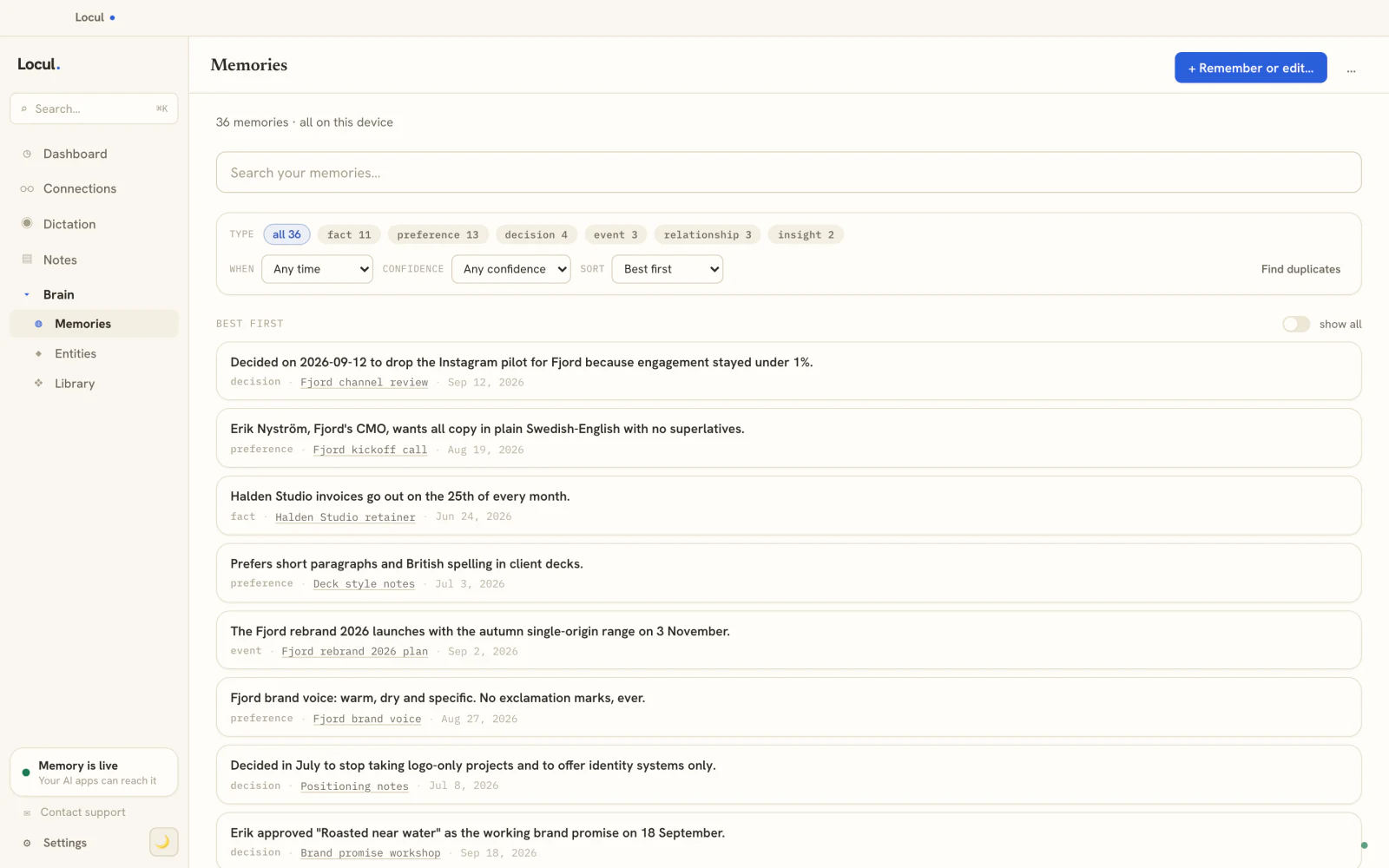
This is what Locul is: a local-first desktop app that builds a searchable second brain from what you already produce, keeps it current on its own, and serves it to your AI tools over MCP. It reads your local notes and PDFs, your dictation, your Notion, and your LinkedIn profile, and it distills them into memories with a specific kind (a fact, a preference, a decision, an event, a relationship, an insight). When one of those facts changes, the old version is marked superseded and the new one becomes active, so the AI always works from the current truth and the history is never lost.
The wedge against native memory is exactly the two gaps we named at the top. Native memory is one platform and one maintainer, you. A memory layer is every platform and no maintainer, because it watches your real activity instead of waiting for you to update it. Your data stays on your machine, and it works with the AI you already use, including local open-weight models through Ollama if you want everything private.
A stale memory is worse than no memory, because you trust it.
The payoff is not abstract. When the AI has your real, current context, its output gets meaningfully better: articles that sound like you, emails that reflect your actual position, plans that respect your actual constraints. Better input, better output. That is the whole reason to give your AI a memory in the first place, and it only holds if the memory stays true.
Frequently asked questions
Does Claude have memory?
Yes, in four forms. Claude Code reads CLAUDE.md files you write and also keeps its own auto memory of your corrections and preferences. Developers can give their own agents the API memory tool. And the Claude apps, on free and paid plans, carry context across chats. All four are real, and all four are scoped to Claude.
What is the difference between CLAUDE.md and the Claude memory tool?
CLAUDE.md is a file you write and maintain: fixed rules and facts Claude Code reads at the start of every session. The memory tool is an API feature for developers, where the model writes notes to a /memories directory that your own application stores. If you use Claude Code rather than the API, the thing you are probably thinking of is auto memory, the notes Claude Code writes for itself in ~/.claude/projects/<project>/memory/. One is your hand-maintained instructions; the others are the AI's own scratchpad.
Can Claude remember previous conversations?
In the Claude apps, yes: memory carries context from earlier chats into new ones, on free and paid plans. In Claude Code, persistence comes from CLAUDE.md and auto memory, which both load at the start of each session, rather than from replaying past conversations. Either way it stays inside Claude and does not reach your other AI tools.
Do ChatGPT and Claude share memory?
Not continuously. ChatGPT memory lives in your ChatGPT account and Claude memory lives in your Claude account, and neither reads the other. Claude's settings can import what ChatGPT remembers about you once, but after that the two learn separately. If you use both, you are maintaining two memories unless you put a shared memory layer outside both of them.
How do I keep my AI's memory up to date?
Native memory only updates when you edit it or when the app infers something from a new chat, so it drifts. To keep it genuinely current, use a system that watches your real activity, notes, dictation, docs, profile, and marks old facts as superseded when they change, rather than relying on yourself to remember every correction.
Native memory will keep improving, and it is worth using. But if you want one current memory of yourself that Claude and ChatGPT both work from, without you playing librarian, that has to live outside any single app. Locul is a second brain that builds itself and keeps itself current, on your machine, served to whatever AI you use. See how it works.
Keep reading: ChatGPT custom instructions that make AI sound like you and how to build an AI that actually knows you.